
Authentication · Deployed
Login & OTP Troubleshooting | Daman Game Guides
Troubleshoot Daman Game sign-in: OTP delays, SMS filtering, VPN and proxy failures, and device clock errors. This site cannot reset your password.
Work through delivery and network checks before you request another code. This page cannot sign you in, reset a password, or read an OTP.
- Topic
- Sign-in
- Reference build
- v1.0
- Requires
- SMS on your handset
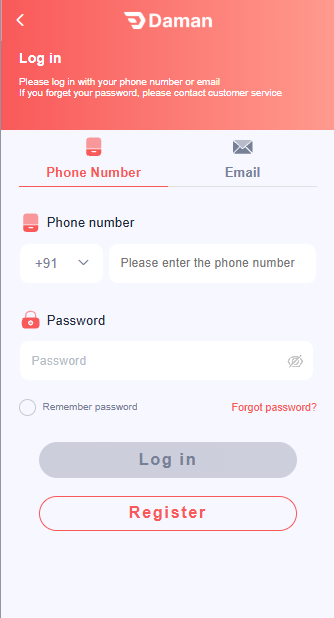
Log-in screen
The picture is the phone sign-in. Email is the other tab. Use the identifier you registered. This page cannot type the password or read an OTP.
-
Phone Number or Email
Stay on the tab that matches the account. On Phone Number, set the country code, then type the national number. Do not put an email address in the phone field.
-
Password
Type the password from signup. An incorrect password is not an OTP failure. Do not send it to anyone who offers to enter it for you.
-
Remember password
Leave this off on a shared phone. It keeps the password on that device.
-
Forgot password
Use that control on the form. This site cannot reset the password. The customer-service line on the screen is not a reason to message a stranger. Those chats are covered on the safety page .
-
Register
Open Register only when this number was never signed up. Check the country code and a leading 0 first. “User not found” is often a format mismatch.
Checks, in order
-
Match the account identifier
Type the registered mobile number as digits only. A doubled country code or a leftover leading 0 will look like a missing account. Format rules are on the registration page .
-
Turn off VPN, proxy, and private DNS
Do this before the next attempt. A rewritten connection fails before any SMS is sent. Set Private DNS to Off or Automatic if the hostname is one you did not choose.
-
Set the phone clock to automatic
A wrong date or time breaks the secure connection and can make a fresh OTP look expired. Use the network time. Do not set the clock by hand to force a code through.
-
Request one code and wait two minutes
Keep the handset on the mobile network, with signal. Open the default SMS app and check the filtered, spam, and blocked lists. Do not request a second code during that wait.
-
Change the path once, then stop
If the first SMS never arrives, switch from Wi-Fi to mobile data, confirm any café or hotel login page is already completed, and request one more code. Further requests can pause delivery.
-
Stop if a person offers to enter the code
Read the OTP only into the form on your device. Someone who asks you to forward the SMS, share your screen, or install a remote-control app is not a fix. Continue on the safety page .
Match the message on screen
Wording changes between builds. Use the closest row. This is not an operator error catalog, and it does not include bypass steps.
| What you see | What it usually means | What to check |
|---|---|---|
| Network error or timeout | The request is blocked by a proxy, VPN, captive portal, or DNS filter. | Turn the VPN off, finish any Wi-Fi login page, and retry on mobile data. |
| Secure connection failed | The device clock is wrong, or a proxy is intercepting HTTPS. | Set date and time to automatic. Remove the HTTP proxy and unknown Private DNS. |
| OTP expired | An older SMS was entered, or the code sat too long. | Enter only the newest message. Request one new code and wait for it. |
| Too many attempts | Codes were requested in a burst. | Wait before you try again. Do not install a tool that claims to skip the SMS. |
| User not found | The typed number does not match the registered value. | Compare the country flag and any leading 0 with the registration checklist. Do not open a second account until those cases are ruled out. |
| Incorrect password | The password does not match. This row is not an OTP failure. | Use the password reset inside the app. Do not send the password to a chat. |
Proxy, VPN, and clock
Sign-in for reference build v1.0 still uses the phone network and the device clock. A VPN that works for browsing can still drop this request. Private DNS hostnames, ad-blocking DNS, and an HTTP proxy in the Wi-Fi advanced settings do the same.
Login questions
What should I check first when an OTP does not arrive?
Confirm the number on the form is the SIM in your phone, wait two minutes, and look in the SMS app filtered or blocked list. Then turn off any VPN and request one new code on mobile data.
Why does login fail on a VPN or proxy?
A VPN, HTTP proxy, or private DNS server can block or rewrite the sign-in request. Turn those off, set the phone clock to automatic, and retry. Complete any café or hotel Wi-Fi login page first.
Private DNS is set to a hostname I do not recognize. Should I leave it?
No. Set Private DNS back to Off or Automatic, then retry sign-in. An unknown DNS hostname can block or redirect the login request.